Modular trade show displays can turn a group of reusable units into several booth layouts, but only when those parts are planned as one compatible system. The useful question is not whether a display is described as modular. It is whether the structure, graphics, functional elements, packing plan, and installation responsibilities work across the shows you actually attend.
What Are Modular Display Units for Trade Shows?
Modular display units are reusable components designed to connect within a defined exhibit system. Depending on the system, a unit may be a frame, wall section, graphic panel, lightbox, counter, shelf, monitor mount, storage element, or connector. Different combinations of these parts can create different booth layouts.
The same broad approach may also be described as modular trade show exhibits or modular exhibition stands, although suppliers do not always use these terms consistently.
The word “unit” matters because a modular booth is not one fixed finished product. It is a coordinated library of components. A 10×10 inline booth may use part of that library, while a 10×20 or island configuration may use more frames, different graphics, and additional functional elements.
Modular does not automatically mean portable, tool-free, or suitable for self-installation. Those are separate characteristics. A genuine modular proposal makes compatibility visible through configuration drawings instead of relying on the label alone.

How Modular Display Units Work as One Booth System
A modular trade show booth works only when its structural, graphic, and functional units are planned as one system. A change in one category often changes the others: moving a frame can alter the graphic orientation, screen position, traffic flow, and even the packing plan.
| Unit category | Role in the booth | Relationship that matters |
|---|---|---|
| Structure | Establishes walls, openings, height, and usable floor layout | Determines where graphics and functional units can go |
| Graphics | Creates branded surfaces and visual hierarchy | Must match the frame dimensions, orientation, and viewing direction |
| Functional units | Supports products, media, meetings, storage, and staff activity | Affects layout, access, utilities, and structural requirements |
| Connections and packing | Keeps repeated configurations organized | Links each part and case to the correct layout and assembly sequence |
This dependency is what separates a reusable system from a collection of attractive parts. A rendering shows the intended appearance, while a component-based drawing shows how the booth can be reproduced. Labeled components and a packing map carry that logic from the design file into the next installation.
Common Types of Modular Display Units Used at Trade Shows
Most modular trade show booths are built from a small group of recurring unit types. The list below focuses on units commonly used on the show floor rather than every connector, finish, or specialty accessory available within a modular system.
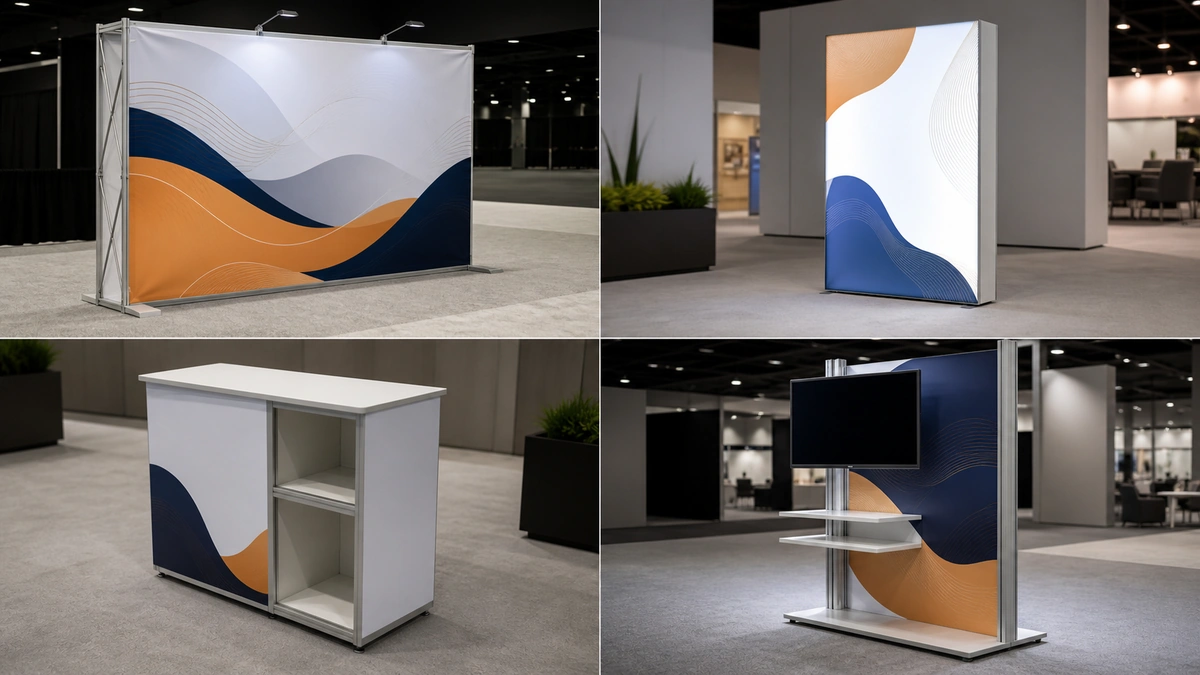
Backwall and frame units
Backwalls and frames form the basic structure of many inline and peninsula booths. They create the main branded surface and can support side returns, headers, or open sections when the layout requires them. Their practical value comes from providing a stable core that can be extended or reduced across planned footprints.
Graphic and lightbox units
Fabric graphics, rigid panels, and lightboxes are common because they update the visual message without replacing the entire structure. When a layout changes orientation, however, the same graphic may no longer fit the new frame position or viewing direction. Lightboxes also bring power and cable routing into the layout.
Counter and storage units
Reception counters, demonstration counters, lockable cabinets, and compact storage units support daily booth operation. Their footprint matters: a storage unit that works comfortably in a 20×20 layout may restrict circulation in a 10×10 booth, so access and door clearance matter as much as capacity.
Product and monitor display units
Shelves, sample displays, monitor mounts, and media supports are frequently added when the booth needs to present products or digital content. The frame, mounting method, equipment dimensions, weight, power, and cable path determine whether a particular unit works in the final layout.
How Modular Units Reconfigure Across Booth Sizes
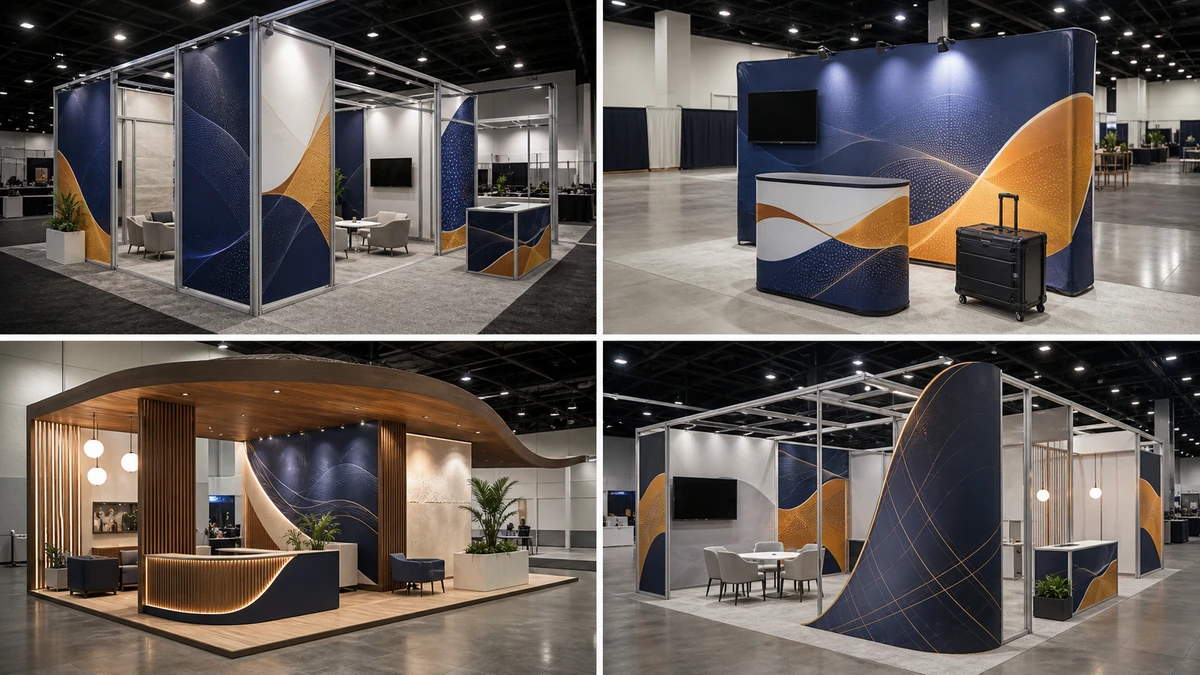
Modular units reconfigure by retaining compatible components, adding or removing structure, repositioning functional areas, and matching the graphics to the new layout. A modular booth is not resized like a digital image; every footprint is a separate arrangement that must work on its own.
| Booth footprint example | What may stay | What may change | What must be verified |
|---|---|---|---|
| 10×10 inline | Core frames, selected graphics, counter, limited product or media units | Number of walls, storage capacity, graphic coverage | Height and setback rules, access, sightlines, power, and installation scope |
| 10×20 inline | Core frames plus compatible extensions, reusable functional units | Added graphics, extra display zones, meeting or storage arrangement | Open-side requirements, component count, graphic map, packing, and labor |
| 20×20 island | Some compatible frames, counters, media, and storage units | Orientation, entrances, towers or overhead features, multiple visible faces | Island rules, engineering, electrical and AV coordination, rigging if applicable, and complete service scope |
These examples describe a planning method, not a universal kit. The components that can move between footprints depend on the system and the final design.
What can usually stay
Core frames, counters, storage modules, monitor supports, and some graphic elements may stay in the component library when their dimensions, connection points, and functions remain compatible. Reuse is strongest when those components were selected around a multi-show plan from the beginning.
What may need to change
Graphics often change when their orientation, size, or viewing distance changes. Additional frames, connectors, lighting, flooring, storage, or meeting elements may also be required. A larger footprint can introduce new open sides and new sightlines rather than simply requiring more wall length.
What remains layout-specific
Each footprint still needs its own drawing, component list, graphic map, electrical and AV requirements, packing allocation, and installation scope. The current exhibitor manual governs height, setbacks, open sides, labor, and other show-specific conditions; general industry guidance cannot replace it.

For a program that includes several footprints, build a configuration matrix for the next 12 to 24 months. List each show, booth size, required functions, reusable components, new components, graphics, services, and approval deadlines. This reveals whether the proposed component library is genuinely reusable.
Modular vs. Portable vs. Custom vs. Hybrid Displays
Modular, portable, custom, and hybrid displays describe different design and delivery approaches. None is automatically better; the right choice depends on how often the layout changes, the visual freedom required, the logistics plan, and the complexity of the exhibit.
| Approach | Primary characteristic | Typical strength | Main trade-off |
|---|---|---|---|
| Modular | Compatible parts can be reconfigured | Supports repeated use and planned layout changes | Reconfiguration is limited by system compatibility, graphics, and approved layouts |
| Portable | Designed around compact transport and relatively simple deployment | Useful for smaller footprints and controlled setups | May offer less architectural freedom, storage, or integrated functionality |
| Custom | Built around a specific creative and functional brief | Supports distinctive forms and highly tailored experiences | Reuse, modification, freight, and installation must be planned case by case |
| Hybrid | Combines a reusable system with custom elements | Balances repeatable structure with differentiated presentation | The interface between standard and custom parts must be documented |
A custom modular trade show display may use a repeatable frame system with purpose-built finishes, graphics, or features. The label alone does not show how much of the exhibit is reusable; the component list and future configuration plan do.
Where Modular Display Units Fit—and Where They Do Not
Modular display units fit best when a trade show program has recurring events, changing booth footprints, or regular graphic and functional updates. They may be a weaker fit when one highly specific structure, unusual engineering, or a heavy product presentation controls the entire design.
Good-fit conditions
A modular approach deserves serious consideration when:
- You can identify several upcoming shows and their likely booth sizes.
- Core functions such as product display, meetings, media, and storage repeat from show to show.
- Brand graphics change more often than the underlying structure.
- Components can be packed, stored, inspected, and tracked between events.
- The service and installation model can be defined for every venue.
These conditions create a practical basis for reuse. They do not guarantee savings by themselves.
Warning signs that another approach may be better
A custom or hybrid approach may be more suitable when:
- The design depends on a one-time architectural form or flagship experience.
- Heavy products, unusual spans, suspended elements, or special utilities drive the structure.
- The future show calendar and booth footprints are too uncertain to define a component library.
- The required appearance cannot be achieved within the available system.
- Repeated freight, storage, refurbishment, and graphic replacement would outweigh the expected reuse.
The meaningful cost comparison covers the whole show program rather than the first frame price. One useful planning model is:
Program cost per show = (initial exhibit cost + layout adaptations + added components + graphics + freight and drayage + storage + installation and dismantling + refurbishment) ÷ planned shows
This is a decision framework, not a universal accounting formula. It makes the main point visible: a reusable structure creates value only when it remains usable across the planned configurations and does not shift excessive cost into adaptation, logistics, storage, or on-site labor.
How to Choose Modular Display Units for Your Trade Show Program
Choosing modular display units is an early program decision: the goal is to find an approach that can support the planned layouts and functions without creating an unreasonable operating burden. The visual concept comes after those non-negotiable requirements are visible.
Start with the show program, not the kit
The starting point is a list of confirmed and likely shows, booth footprints, open sides, locations, and dates, paired with the functions required in each layout. Products, demonstrations, monitors, meetings, storage, reception, and staff activity give the trade show booth design a practical foundation. They also prevent the project from being shaped around a visually attractive kit that cannot support the work inside the booth.
Test whether the component library survives layout changes
The earlier configuration matrix now becomes a selection tool. It shows where extra frames or graphics enter the program, which functions disappear in smaller footprints, and whether existing accessories still fit. Graphics, lighting, products, and AV belong in the same test because a frame can be structurally reusable while its display surface or mounting arrangement is not.
Account for the operating burden
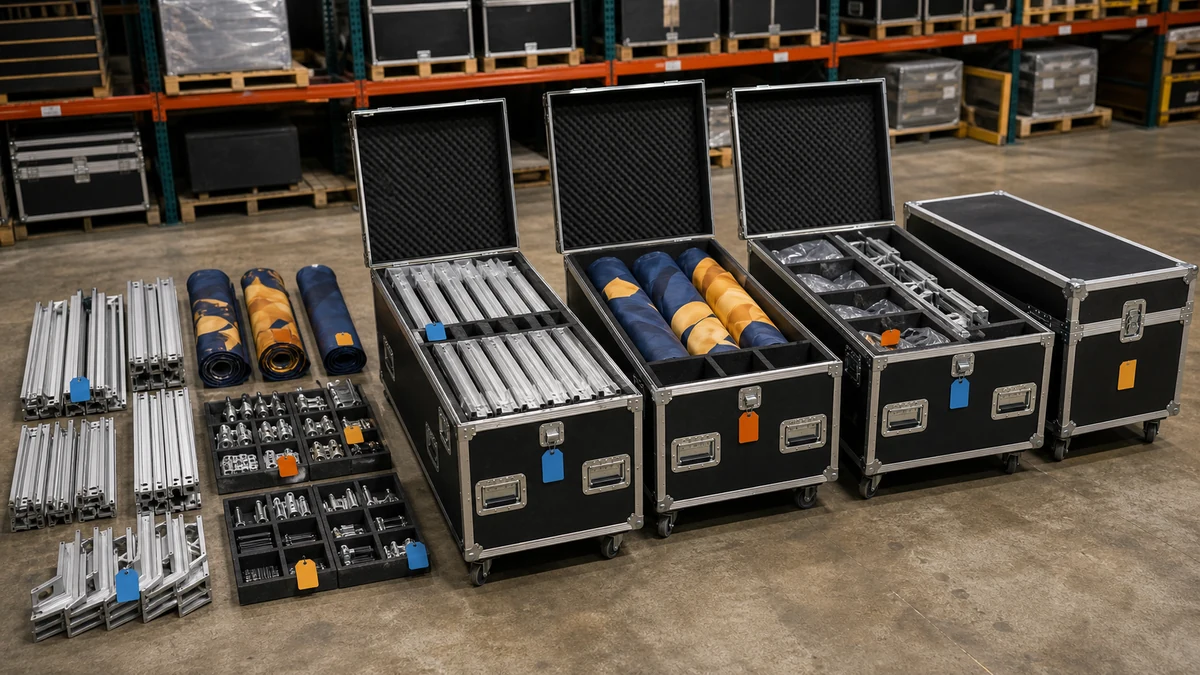
A compact case plan is useful only when components remain identifiable, protected, and practical to assemble. Storage conditions, spare hardware, inspection, replacement parts, and the handoff between the exhibit provider, official contractors, venue labor, and the on-site team all affect repeated use. Tool-light construction does not automatically mean that self-installation is allowed at every venue.
Decide what to rent, own, or customize
Rental often suits a changing schedule or a program that does not need to own and store every component. Ownership becomes more attractive when layouts and functions are stable enough for repeated use. A hybrid service model can combine rented structure, reusable owned graphics or accessories, and custom elements.
Whichever model is used, its scope should make design approvals, production, logistics, installation, closeout, damage responsibility, and post-show handling visible—not just the item list.
Pre-Production Approval Checklist
Selection decides which approach fits the program; approval locks the exact version that will be produced, rented, packed, and installed. At this stage, a short configuration-specific checklist is more useful than another design discussion.
| Approval item | What should be locked | Why it matters |
|---|---|---|
| Layout and component inventory | Dimensioned drawing; component IDs and quantities; new, reused, rented, and customer-supplied parts | Prevents a rendering from being mistaken for a buildable configuration |
| Graphic map | Finished size, material, orientation, location, and reusable versus show-specific surfaces | Keeps artwork aligned with the correct frames and viewing directions |
| Packing and installation | Case allocation, labels, hardware, protection, and assembly sequence | Makes shortages visible and connects each packed part to the installation plan |
| Technical and venue dependencies | Structural review, electrical, AV, internet, rigging, fire-safety documents, material handling, and venue approvals where applicable | Keeps engineering and show-specific responsibilities attached to the design |
| Commercial and post-show scope | Freight, show-site services, I&D, storage, inspection, repair, damage, missing parts, and next-show preparation | Prevents gaps between the quoted item list and the full operating responsibility |
A pre-build review can then compare the assembled booth with this document set before shipment. For a modular configuration, the useful evidence is not only the finished appearance but also the labels, graphics, functional units, and component inventory behind it.

Frequently Asked Questions
Can modular display units be rented instead of purchased?
Yes, modular components may be available through a rental program, but availability depends on the provider’s inventory, allowable modifications, rental period, damage responsibility, and required configuration. Rental describes how the exhibit is supplied; modular describes how its components are organized and reconfigured.
Can modular units support monitors, shelves, or product displays?
They can when the frame, mounting points, and layout support the actual equipment or product. Dimensions, weight, access, power, AV, and cable routing are the deciding inputs. An accessory shown in a catalog is not an engineering approval for a particular application.
How should modular display units be stored and maintained between shows?
Storage works best as a continuation of the component system: each unit returns to a numbered packing position, graphics remain protected, and damage or missing hardware is recorded against the inventory. The next configuration can then be checked before shipment instead of being reconstructed from memory at the venue.
Final Thoughts
The real advantage of modular display units is controlled reconfiguration, not the label itself. A useful system connects compatible structure, graphics, functional elements, and handling records to the actual booth sizes and show conditions in your program.
If you are evaluating a modular, custom, hybrid, or rental approach, send King Exhibits your upcoming shows, booth footprints, required functions, existing graphics or AV equipment, budget range, and reuse preferences. The team can help compare the available approach and align design, production, logistics, and show-site milestones around the approved plan.